|
 |
| MP3 to WAV / MP3 WAV Converter |
| |
|
Guide: How to convert MP3 to WAV with MP3
to WAV conversion tool .
How to convert MP3 to WAV with this MP3 to WAV Converter? This
guide will help you
converting MP3 to WAV with MP3 to WAV tool. This MP3 audio converter
can convert
MP3 file to other popular formats and also can convert audio formats
between MP3,
WAV, WMA, MP4, M4A, MP2,SPX, APE, OGG, AAC,AC3,WavePack(wv) and FLAC.
|
Introduction of MP3 to WAV conversion tool
Step-by-step Guide: How to convert
MP3 to WAV with this MP3 to WAV converter?
Step 1: Click here free download and install this MP3
to WAV conversion tool and then run it.
Step 2: Click "Add"
button from the main interface to load MP3 files. Then click combo-box
to
choose "WAV" as the output format. MP3 files will be
loaded as the following picture.
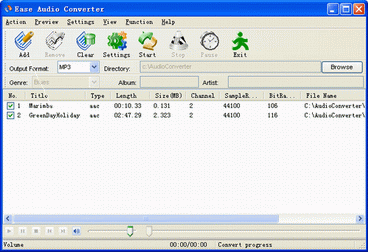
Step 3: Click "Browse" button to
choose an output path or use the default path without any operation:
Step 4: Click "Settings" button.Open the WAV Settings
window, you may set any frequency, channels,
output format
. You may also only select wav quality by quality comobox.
Default settings: frequency:44100hz, channels:stereo, output format:16bits wave(PCM).
WAV Settings:

Step 5:Everything is finally ready for the
MP3 to WAV Converter to work.At last click the "Start"
button. It will start converting MP3 to WAV.
|
|
| |
|
mp3 converter,wma converter,aac
converter,wav converter,ogg
converter,mpc converter,
flac
converter, tta converter,wv
converter,ape converter,tta
converter,spx converter,
ac3
converter,m4a converter,cd to flac converter,cd to mp3 converter,cd to ape converter
cd to mpc converter, cd to tta converter |
|